The ALT tag is your friend
Feb. 9th, 2006 12:24 am![[personal profile]](https://www.dreamwidth.org/img/silk/identity/user.png) zdashamber
zdashamberArticle in the San Francisco Chronicle about the head of the California Association of Blind Students suing Target for insisting on a blind-inaccessible website. Sez their laywer, "... it's completely unusable. A blind person cannot make a purchase independently on target.com."
Sez me: it's about damn time. Remember the old tagline, "DOS means never having to live hand to mouse"? A keyboard is not as clumsy or as random as a mouse; it's an elegant input device for a more civilized age. (Unless we're talking stave mice.) The article points out two ways target.com fails: for one, it apparently uses image maps without backup, requiring a mouse. What if you're blind? What if you've got Parkinson's? What if you're on a laptop and mousing accuracy ain't? But hey, some guy at Target thinks it looks snazzy.
The other failure of target.com mentioned is that it doesn't use alt tags on images. "Duh" can't even begin to cover this. How does a person even learn to put an image on the web without also learning about height, width, and alt?
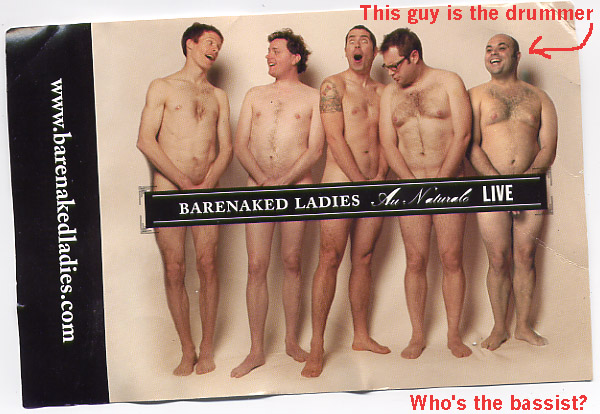
Which is the main reason the article caught my eye, because I've been meaning to tout alt for a couple months now. See, I wrote a random post a full year ago in which I included a picture of the Barenaked Ladies. As late as December I was still getting comments on it from random-ass people. WTF? thought I. So I checked Google Images, and that written-on scan of a stepped-on postcard was 3rd on a search for Barenaked Ladies.
Because I had an informative alt tag on the thing!
So just in case you guys want to add images to your blog by hand and you're not quite sure what to do, it's very simple. Every image you add should have code that looks like this:
<img src="x" height="x" width="x" alt="x">
You replace the x's with info specific to the image. The code of my famous BNL image looks like this:
<img src="http://www.z-amber.com/LJ/bnl-bassist.jpg" height="422" width="603" alt="the barenaked ladies, 5 guys naked with a single bar across their nether regions">
I wasn't fishing for hits with the alt tag there. I was keeping an eye out for the chance that the link would break and the alt tag would be all that remained. "And only I have escaped to tell thee..." Also, I like preparing for highly unlikely events like "a blind person reading my blog"--and it's just so damn easy!
How spendid that virtue is rewarded with hits.
And while I talk about alt a lot, don't forget height and width. Dammit, especially on a LJ. Friendslists loading glacially as LJ tries to sort out how much space to allow for an image... Arrr. Want to see a cool demonstration? The guy who does Toothpaste for Dinner (fun surreal webcomic!) has made a page that apparently calls up a random selection of the images posted in LJ (with links!) at the moment you click. It's fascinating! But it can be very very slow, because it strips all tag info off them. (Or maybe in 50-some photos, not a one had tag info. Surely such woe cannot be.)
Man, how can I know the height and width of my images? you may ask. What a pain in the ass to track that all down and type it all in! you may say. This is true. Thus, I use the free Notepad replacement program Notetab, which has a macro built in that makes a webpage out of all the images in a file. I have a file that contains every image I've put on my LJ (makes it easier to track 'em), I run it through Notetab, it spits out the HTML, all I have to do is cut and paste and write the alt. So very simple.
Height, Width, and Alt are part of the Img tag! Do it for the blind! Do it for the hits!
Thus endeth today's edification.
Sez me: it's about damn time. Remember the old tagline, "DOS means never having to live hand to mouse"? A keyboard is not as clumsy or as random as a mouse; it's an elegant input device for a more civilized age. (Unless we're talking stave mice.) The article points out two ways target.com fails: for one, it apparently uses image maps without backup, requiring a mouse. What if you're blind? What if you've got Parkinson's? What if you're on a laptop and mousing accuracy ain't? But hey, some guy at Target thinks it looks snazzy.
The other failure of target.com mentioned is that it doesn't use alt tags on images. "Duh" can't even begin to cover this. How does a person even learn to put an image on the web without also learning about height, width, and alt?
Which is the main reason the article caught my eye, because I've been meaning to tout alt for a couple months now. See, I wrote a random post a full year ago in which I included a picture of the Barenaked Ladies. As late as December I was still getting comments on it from random-ass people. WTF? thought I. So I checked Google Images, and that written-on scan of a stepped-on postcard was 3rd on a search for Barenaked Ladies.
Because I had an informative alt tag on the thing!
So just in case you guys want to add images to your blog by hand and you're not quite sure what to do, it's very simple. Every image you add should have code that looks like this:
<img src="x" height="x" width="x" alt="x">
You replace the x's with info specific to the image. The code of my famous BNL image looks like this:
<img src="http://www.z-amber.com/LJ/bnl-bassist.jpg" height="422" width="603" alt="the barenaked ladies, 5 guys naked with a single bar across their nether regions">
I wasn't fishing for hits with the alt tag there. I was keeping an eye out for the chance that the link would break and the alt tag would be all that remained. "And only I have escaped to tell thee..." Also, I like preparing for highly unlikely events like "a blind person reading my blog"--and it's just so damn easy!
How spendid that virtue is rewarded with hits.
And while I talk about alt a lot, don't forget height and width. Dammit, especially on a LJ. Friendslists loading glacially as LJ tries to sort out how much space to allow for an image... Arrr. Want to see a cool demonstration? The guy who does Toothpaste for Dinner (fun surreal webcomic!) has made a page that apparently calls up a random selection of the images posted in LJ (with links!) at the moment you click. It's fascinating! But it can be very very slow, because it strips all tag info off them. (Or maybe in 50-some photos, not a one had tag info. Surely such woe cannot be.)
Man, how can I know the height and width of my images? you may ask. What a pain in the ass to track that all down and type it all in! you may say. This is true. Thus, I use the free Notepad replacement program Notetab, which has a macro built in that makes a webpage out of all the images in a file. I have a file that contains every image I've put on my LJ (makes it easier to track 'em), I run it through Notetab, it spits out the HTML, all I have to do is cut and paste and write the alt. So very simple.
Height, Width, and Alt are part of the Img tag! Do it for the blind! Do it for the hits!
Thus endeth today's edification.
no subject
Date: 2006-02-09 06:04 pm (UTC)